🛠 > Lean Forms & Tools Directory > Download Free Forms & Tools
Red Tag
The red tag system is simply a communication tool used to identify items that a person has flagged for removal from a work area. While the tagging is most frequently done during kaizen events, it can be done at any time.
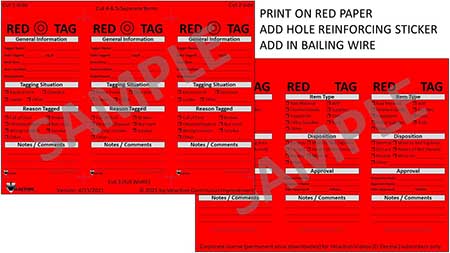
In a nutshell, when a person finds an item that they either don’t know what it is, or is not needed in a process, they tag it. The red tag acts as a signal to everyone else in the area that someone intends to move the item out of the work area at some point in the near future. This leads to a discussion about the item, and ultimately, a decision about whether or not the item stays or goes.
The red tag process is closely tied to the “Sort” step of the 5S process.
Our Red Tag Form is available for you to download and print. Print it out on red cardstock and add in reinforcement labels and bailing wire, if desired.


Watch our 5S and Visual Management Video

During the sorting step of 5S, unnecessary items are removed from a work area. Because teams are often created ad hoc, there is the potential for someone to inadvertently remove an item that is actually needed for production. The red tag process helps eliminate sorting errors.
The red tag process follows this basic flow:
- A person identifies an item in question.
- The person fills out a red tag and attaches it to the item.
- The person waits.
- If another person questions the red tag, the people with skin in the game decide about whether to keep the item or not.
- If the item is to be kept, the red tag is removed.
- If the item is not to be kept, it is disposed of, often to a red tag area. This is basically a purgatory for items with value but no homes. An item that is not needed in one area may still be put to productive use in another area. Some organizations require approval to remove a red tagged item.
- Items in the red tag area that are not claimed by a designated date should be removed to prevent the area from turning into a dump. The disposition can range from selling the equipment, to giving it/auctioning it to employees, to scrapping it.
The red tag system is a safety net that keeps overly eager improvement teams from taking necessary equipment from an area. Some items are used only intermittently and can look like they are not needed for a process.
If an item is red tagged and the tag is removed, the item should not just be left as it is, though. It should have a location designated, and the item itself should be labeled as to its use. This will keep future teams from red tagging the equipment over and over.
Red Tags
Red tags come in a wide range of shapes and sizes, but the most commercially available red tags will have a wire or elastic loop on them to attach to the item.
The information you need on the red tag, at a minimum, includes the name of the tagger, the reason it was tagged, and the date it will be removed. This is a bare bones version.
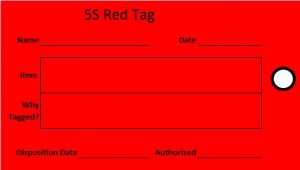
DOWNLOAD A (MUCH BETTER) PRINTABLE RED TAG FORM
More information may also be required, especially if the item is to be moved to a red tag area. The additional information helps to catalog or sort the equipment.
Red Tag Area
The red tag area is simply a storage location for red tagged items that is segregated from the production areas. It must be kept neat and orderly so the equipment available in it can be quickly surveyed by anyone in need. When a red tag area is well maintained, improvement teams will be more likely to make use of the red tag area, as they will have a better chance of finding something they need. I also recommend that the kaizen team leader does a quick walk-through of the inventory early in a project. As people talk about ideas later in the project, the team leader may be able to direct them to some relevant equipment.
Similar to the initial red tagging, items in the red tag area should have a limited time on the shelf. The person managing the area should assess how long to leave the items in the area, based on the condition, general usefulness, inherent value, and likelihood of future use. A computer monitor in good condition should be kept as long as it is not outdated. A brand new Widgetron 4000 spare LED array should not be kept on the shelf long, if it is even put there at all. There is just not a likely potential use for it, even if it is an expensive item. Try reselling the item or donate or discard unnecessary but valuable items right away.
Advanced companies often list the items in the red tag area in an online catalog that can be quickly reviewed from anywhere in the company. This reduces the chance that someone will not purchase an item that is already owned by the company.
When you create a red tag area, set up rules so items are not simply dumped and left to rot. Remember, the items left in the red tag area must have potential value to someone else in the company.
Disposition of Red Tagged Items
When items are red tagged, they go to the red tag area. But what about after they’ve been sitting there for ages? There are several options on what to do with them.
- Throw them in the trash.
- Scrap or recycle the item.
- Sell the item.
- Donate the item to a charitable organization.
- Give the item to employees or auction them. Be careful with this, though. It opens the door for bad apples to red tag items for personal use. This is uncommon but is worth mentioning.
- Hang on to the item as a special circumstance. This is generally done if it is a large consumable you know will eventually be used, or if there is an upcoming project that might make use of it. If it is a consumable, though, reconsider if you want to store it in the red tag area.

Words of Warning for Red Tags
- Don’t just move an item out of an area. Red tag it first. It will help prevent surprises.
- Don’t let the red tag area turn into a dump. Items must have some value to be placed there.
- Make someone responsible for the red tag area, or it will slowly (or rapidly!) deteriorate.
- Train everyone in the work area on red tags, even if they are not on an improvement team. They need to know what to do if a piece of necessary equipment gets tagged.

The red tag system is a safety net for you. It keeps you from walking into your work area after a kaizen team has been working late the previous evening and discovering that a needed item has found its way into a dumpster.
One good way to avoid having to spend time resolving red tagged items, though, is to make sure they are properly labeled and have a designated home. Most red tagged items come from the back of storage rooms or were tucked away in some cubbyhole. When an item is properly 5Sed, it is less likely to be tagged.

Exclusive Content for this Section is available at academy.Velaction.com

Key Points for Red Tags
- The red tag is a communication tool that prevents inadvertent disposal of equipment.
- Red tags require a system. This often includes a red tag area.
- The red tag area provides a wealth of items for improvement projects at no cost.
- Make sure the whole team is trained on the red tag process, so they know what to do when they come across a tagged item.

Steps to Using Red Tags
- Get some red tags and set up a red tag area.
- Develop your red tag process.
- Train the entire team on red tagging.
- Start red tagging.
If this seems simple, it is. While it can take some trial and error to get a red tag system up and running, the concept is not complicated. The key is to monitor the red tag area to prevent it, ironically, from becoming a disorganized part of the 5S process.
0 Comments